Don't Be a Victim
We recommend everyone familiarize themselves with these all-too-common (and all-too-often successful) attempts to defraud people online. If you receive an email you think is fraudulent, you can mark it in Gmail as phishing or forward it to iso-staff@humboldt.edu so we can check into it. If you believe you've been the victim of a scam, please contact the University Police Department.
- Phishing and Spam Emails
- Common Scams and How to Avoid Them
- Harassing and Unwanted Calls
- Receiving MFA Alerts for Login Attempts You Did Not Initiate
- What to Do if You Visited a Malicious Website
- What to Do if You Clicked a Suspicious Link
- What to Do if You Downloaded a Malicious File
- Protecting Yourself from Social Engineering
Phishing and Spam Emails
Despite all our warnings, some Humboldt faculty, staff, and students are still clicking on and/or responding to fraudulent email messages (although more that 50% fewer of you than in February of this year - so that's good news). When you do interact with fradulent emails, you are handing your Humboldt User Name and Password over to the scammers, who then use them to generate even more fraudulent email. The more they do this, the likelier they are to hit gold - access to banking and credit card information, social security numbers, health insurance data - all of which they can sell for a lot of money.
ITS sent the following test-phish in September 2018 - did you/would you have spotted these clues?
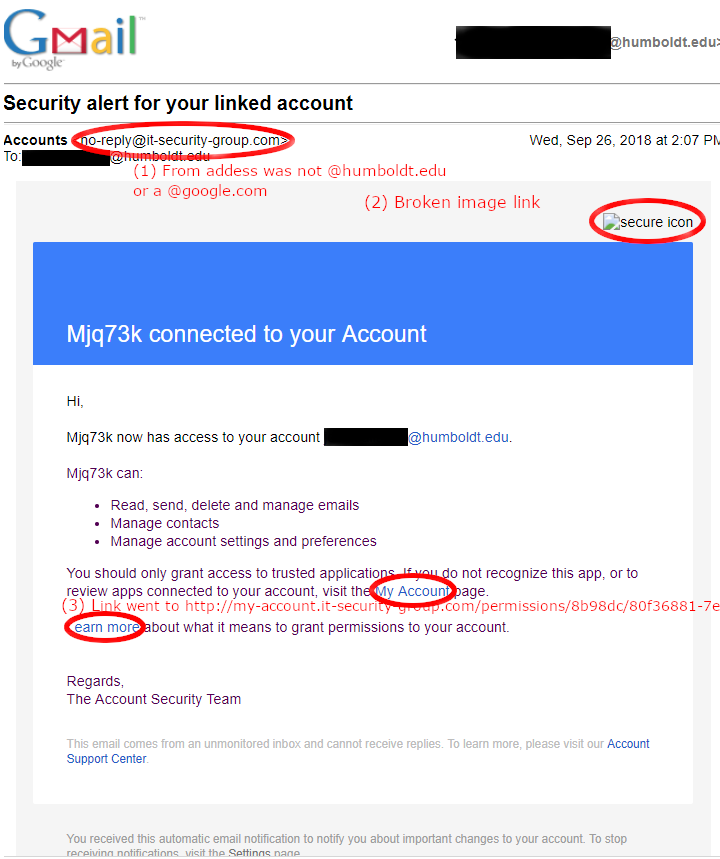
It is VITALLY important that you keep your Humboldt User Name and Password safe and NEVER share it with anyone.
Humboldt will never ask you to provide your password, social security number, or any other personal information by email. If in doubt, do NOT respond to suspicious email, and do NOT click on any links in suspicious emails. Make use of the Gmail and Outlook spam and phishing reporting tools and forward suspicious emails to help@humboldt.edu.
Any of the following characteristics is a potential indicator of a fraudulent email:
- You are asked for sensitive information (for example, "Click here to verify your username and password")
- The message contains spelling or grammatical errors, or strange wording (for example, thank you, from trusted administrator)
- The email is threatening (for example, if you don't do this, your account will be turned off or deleted)
- The email directs you to a slightly incorrect web address (for example, by asking you to visit http://www.humboldt.com/account instead of humboldt.edu)
- The message appears to come from an unknown or untrusted sender (for example, from administrator@humboldt.com)
- The email contains unexpected/inaccurate content (for example, "you've exceeded your email quota")
- The message is generically addressed (for example, "Dear Humboldt customer")
- You are asked to download something (for example, "Click here to get the necessary virus update file")
- You are asked to act urgently (for example, "You must click here immediately to avoid having your account terminated")
Common Scams and How to Avoid Them
Received an offer too good to be true? Something like:
A rental for well below market value so you can “keep an eye on the place”?
During peak rental season scammers will copy real listings and all details and then repost them with a more attractive price. They’ll often say that they’re going out of town for a prolonged period of time and just want someone who can keep an eye on the place. The property does exist, but the scammer is hoping you'll be so eager to lock in the great deal you'll send over first, last, and deposit before realizing the post is not legitimate.
Free piano or high value item after a stranger passes, so that “it goes to a good home”?
This is a common scam where users will get an email with a story about someone recently passing. This person will have left behind some valuable items, and the person sending the email wants those items to go to someone who will use and appreciate them. We frequently see these scams mention pianos and other instruments as well as Macbooks, cameras, and other valuable items. The scammer will just ask you to pay shipping. There are no items, and the scammer either disappears after receiving the funds meant for shipping, or string you along saying that more money is needed for issues with shipping.
Asking to connect because they're interested in your work, and mentioning their well paying job
A lot of information about your academic work and career is publicly available online. Using a variety of tools scammers can compile this information and send a personalized email to you with minimal effort on their part. They'll mention their position in a lucrative field and start a conversation based on your work, eventually asking if you want to be brought into an opportunity in their field. There is no opportunity, they’ll have you deposit money into a fake investment site that tricks you into thinking your investment is growing when it is not in the hopes that you deposit more. When you go to withdraw you cannot, the money is gone.
Asking to connect because even though you never met, you share a detail from the past, like attending the same school
Similarly to above, scammers will use publicly available information when they reach out to you. They might mention graduating from the same school but in a different year, and eventually tell you about a fake investment opportunity.
Harassing and Unwanted Phone Calls
Harassing or obscene phone calls - threatening language, heavy breathing, silence on the other end of the line - can be a frightening experience. They’re also against the law in California, so call the police if this happens to you. Provide as much information as you can about the caller:
- Gender and estimated age
- Manner of speaking, accent, speech impediment
- Date and time of call(s), caller ID
- Background noise, signs of intoxication
- Content of call
The phone company can also set up a trap or trace to track down the offender; this is best done in conjunction with law enforcement as the information will be given to them, not you. If the caller can’t be tracked down, your best course of action is probably to change your phone number.
Other ways of discouraging these types of caller:
- Just hang up – eventually they’ll likely get bored and stop
- Let all your calls go to voicemail and leave a greeting along the lines of "I'm sorry we can't come to the phone right now, but you must leave a message. We are receiving 'annoyance calls'. If you do not leave a message we will assume you are the 'annoyance caller' and this call will be traced".
- Spoof the caller by picking up and saying something like "Operator this is the call" and hang up or say "trap" the time and date and hang up.
Do not disclose personal information when called by someone you do not know. Only list your first initial and last name in the phone directory or have an unlisted number.
Children should be instructed to never reveal information to unknown callers and to let all calls go to voicemail unless they recognize the caller ID. Don’t include your number in your voicemail greeting.
Unwanted calls
While not a disturbing or potentially dangerous as harassing calls, unwanted (spam) calls can be a considerable nuisance. Some phone companies have a policy on dealing with these; call your local phone company to find out what their policy is.
The most effective and easiest way to prevent unwanted calls is to register your home and/or cell number(s) with the National Do Not Call Registry operated by the Federal Trade Commission (FTC). There are still a lot of junk mail faxers in operation, too, so office fax machines should also be registered. Go to www.donotcall.gov and follow the instructions to register all the numbers you want to protect, and calls should stop after 30 days.
Receiving MFA Alerts for Login Attempts You Did Not Initiate
What to do when receiving MFA alerts you didn’t initiate
What is MFA?
MFA, or Multi Factor Authentication adds another layer of security to the login process. After entering your password you are prompted to confirm your login via a code, push notification, phone call, or other means. This means that if your password is compromised the malicious actor can’t login with just that password, they need to be let in after entering your password.
What is an MFA Fatigue Attack?
An MFA fatigue attack takes advantage of how annoying it is to be spammed with alerts. A malicious actor will repeatedly enter your password, which sends an MFA alert to you. They will do this repeatedly until you approve one of the alerts. Once you have approved an alert they have access to your account, your information, and your files.
Red flags
Before approving a Duo alert you should see if it matches any of the red flags below:
- Receiving alerts for login attempts, but you did not login before receiving it
- Receiving multiple alerts in a short period of time
Signs of being targeted by an MFA Fatigue attack
If you receive an MFA alert that was not for a login attempt you just initiated, then someone else entered your username and password. You should immediately change your password and contact security@humboldt.edu to let them know your account has been compromised. Security will investigate how your password was compromised, confirm there was no further compromise and help you take steps to prevent this from happening again.
If you believe you have been compromised, reset your password immediately using the link below.
For more password management information and options
https://its.humboldt.edu/accounts-passwords/password-management
Also reach out to security@humboldt.edu or call directly at (707) 826-3815. Once we are aware of a fraudulent attempt to login to your account we will investigate how your password was compromised, and if any successful attempts to login have been made.
What to Do if You Visited a Malicious Website
What is a malicious site?
Malicious sites try to trick you into visiting them for many reasons. They may try to collect an invasive amount of information from your browser, do a “drive-by” download of malicious software, or trick you into entering information. If you believe you’ve visited a malicious site you should follow the instructions below.
Red flags
Any site can be compromised, so it’s important to always ask if the site matches any of the red flags below:
- Sudden “System alerts” when you visit the site that pretend to be from your device, may claim you have multiple viruses or that your system is corrupted
- Tab/window actively tries to prevent you from closing it with pop ups or by spawning new windows.
- Directing you to call any kind of support number
- Browser stops you from loading the page, warning that the page is malicious or deceptive. Actually visiting the page requires acknowledging that you understand the risks
- Site asks for permissions like location, camera, microphone
- Site begins downloading something automatically
- Site asks you to press certain keys in combination to “prove you are a human”
What to do if you believe you have visited a malicious site
If you believe you have visited a malicious site, be sure to completely close the window and not just the tab. Check your download folders for any new files in case the site did a “drive-by” download. Revoke permissions your browser might have for your camera, location, and microphone. If your homepage or search engine has changed, then reset your browser settings. If there are any browser updates available, immediately update your browser so you have the latest security patches. Ignore any support numbers or "system alerts” the browser prompts you to interact with. Just reach out to security@humboldt.edu or call (707) 826-3815 for assistance and only interact with Cal Poly Humboldt employees.
What to Do if You Clicked a Suspicious Link
What are suspicious links?
We click links constantly. Malicious actors know this and try to take advantage of it by getting us to click malicious links that take you to a site they control. A suspicious link is a link that does not do what it says it does.
Red flags
Before clicking a link, you should see if it matches any of the red flags below:
- Attacker tries to get you to click the link for an urgent, possibly emotional reason
- Hovering over the link reveals an unexpected/unrelated URL in the bottom left of your browser window
- Link is obfuscated with a url shortener (e.g. https://bit.ly/…, https://tinyurl.com/…)
- Link did not take you where you thought it would, or it took you to a malicious site
- Link has odd characters, numbers where characters should be, or other mismatches. See examples below
Technique | Example fake URL | Real URL | What’s wrong? |
Character Swap | rnicrosoft[.]com | microsoft.com | r+n used to “make” an m |
Number swap | googl3[.]com | google.com | 3 is used instead of e |
Subdomain Trick | paypal[.]secure-login[.]com | paypal.com | This is not paypal, it is actually secure-login |
Extension Swap | amazon[.]co | amazon.com | .co and .com are not the same |
Why do bad actors try to get you to click their links?
Malicious actors try to get you to click malicious links for a few reasons. They can steal your credentials, deliver a “drive-by” download, steal information, confirm your email is active for further attacks, and more.
What to do if you believe you have clicked a suspicious link
- Immediately close the tab to prevent any scripts from running.
- Do not enter any information the site asks for.
- Check the url for signs it’s masquerading as something legitimate via swapped characters or other tricks.
- Do not click “allow” on any browser notifications or permission pop-ups.
- Reset passwords for any accounts you think the malicious link was trying to steal.
- If you received the link via email, do not interact with any links on that email including an unsubscribe option. Doing so tells the malicious actor your email is active.
- Clear your browser history and cookies to remove any tracking tokens
- Take a screenshot of the page and the URL for the security team.
- Note the source: Did the link come from email, Slack, or a text message (Smishing)?
What to Do if You Downloaded a Malicious File
What is a malicious file?
Malicious files frequently masquerade as something else. They can look like a spreadsheet, pdf, software update, or anything else you can think of that you would download and use. Once this file is downloaded and run, code hidden in the file can do whatever the bad actor wants it to do on your computer.
Red flags
Before downloading or interacting with a file you should see if it matches any of the red flags below:
- File has two extensions, ie .pdf.exe
- A file ending in .js, .vbs, .bat, .msi, .hta, .ps1, .pif, .jar, .sh, .reg, etc.
- Windows warns you before running the file.
- Author of the file is unknown
- File is unexpectedly large or small
- File asks for elevated permissions to run
Why do bad actors try to get you to download malicious files?
Once you’ve run a malicious file everything on your computer and your network is at risk. The malicious file is usually a “foothold” into your system. They can use this to steal sensitive data, encrypt your files so that you can’t access them, spy on you, and use your computer to do things on their behalf.
What to do if you believe you have downloaded or ran a malicious file
- Don’t delete the malicious file, they are hard to remove and this can lead to a false sense of security.
- Disconnect the device from the internet so the threat cannot propagate or transmit stolen data.
- Keep the device powered on to preserve important data for investigation.
- From a known safe device, change your password using www.humboldt.edu/change
- Immediately reach out to security@humboldt.edu or call directly at (707) 826-3815.
Once we are aware of a malicious file on your device we can begin investigating and take appropriate steps to protect you and your information.
Cold opens and unsolicited emails asking to connect
It’s not unheard of for people to take an interest in your work and reach out to connect. Unfortunately scammers take advantage of this and will try to lure you into conversation under the guise of being interested in what you do, and potentially how it might tie into their work.
When you receive an unsolicited email asking to connect you should examine the information in the email. Scammers will commonly copy a publicly accessible summary of your work to make it look like they have spent time learning about your career before deciding to reach out.
This type of scam is responsible for $15.87 billion in fraud losses according to the FBI IC3 2024 Annual Report. If you are even slightly suspicious of an email we highly recommend that you forward it to security@humboldt.edu and include any context you might have.
Red flags
Before interacting with an email asking to connect you should see if it matches any of the red flags below:
- Does the information included closely resemble any summary of your work online?
- Does the individual mention a high paying job or role they have related to cryptocurrency, finance, or art?
- Are they vague about why they want to connect, only mentioning an interest in your work?
- Do they mention a shared background like attending the same university?
How the scam works:
The individual who reaches out will chat for a while, eventually talking about finances and an opportunity they have that they want to bring you into. It’s very common for them to direct victims to a fake financial services site where they’ll direct them to deposit some money. The site will then show impressive returns, at which point they tell you to deposit more money so you don’t lose out on more possible profit. They will keep this going for as long as they can, but the site is fake and so are the gains. When you try to withdraw from the site it won’t be possible, or they’ll say that there are fees that you need to pay to try to get more money out of you, but either way you will not be able to retrieve the money put in or any gains.
What to do if you believe you have been targeted
If you believe you’ve interacted with this scam please reach out to security@humboldt.edu or call directly at (707) 826-3815.
- Do not interact further, do not send a follow up email saying you are going to stop communicating with them.
- Do not delete any messages, security can analyze them to see what next steps may need to be taken.
- Try and remember any personal information you may have shared, security will use this information to help you protect yourself.
- Do not interact with any emails from someone saying they can help you protect yourself from the scam or recover lost funds, this is a second part of the scam. Only interact with Cal Poly Humboldt Employees or law enforcement.
- Never share login codes, push notifications, or any sort of 2 factor authentication information. There is no legitimate reason someone would ask for this.
- Report the interaction to security@humboldt.edu, they will immediately begin investigating.
- Inform anyone you know who may also be involved to follow these instructions
- If you have been targeted by this scam, other people in the university have been too. Reporting it so it can be investigated will help us detect the situation and prevent anyone from being harmed by it.
Questions?
If you have any questions or concerns regarding fraudulent emails or unwanted phone calls, please contact the Information Security Office at security@humboldt.edu or call them at x3815 (x5555 to reach the University Police Department in an emergency).
Help Desk Hours
Summer 2026Monday - Friday: 8am - 4:30pm
Closed May 25, June 19, July 3
After hours emergencies:
Call UPD at (707) 826-5555
System Status
| Status | System | Est. resolution |
|---|---|---|
| Available | All Systems |
|