Verify Authentic myHumboldt Login
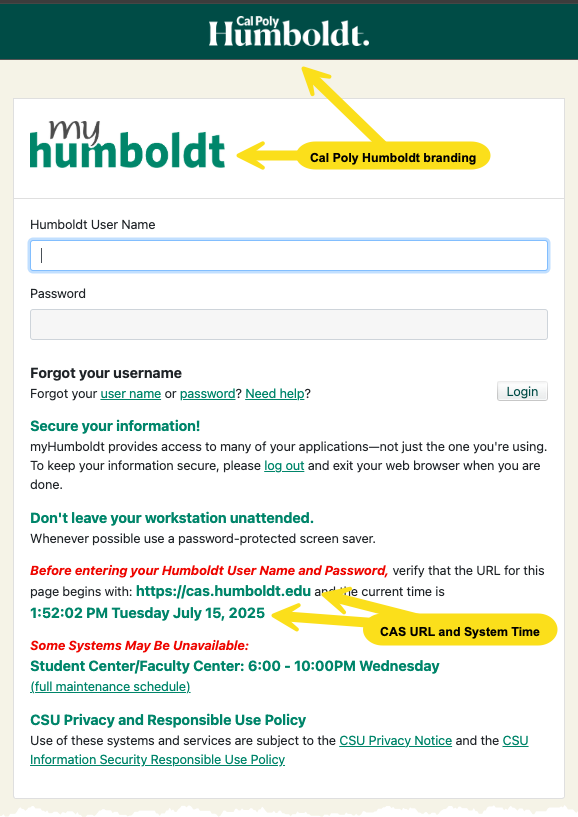
When logging in to any official Cal Poly Humboldt service, it’s critical to verify that the page is legitimate before entering your credentials. Here are the four key indicators to check:
- URL: Ensure that the URL in the browser's address bar begins with https://cas.humboldt.edu/. Look for common misspellings or extra text which doesn’t belong, like cas.humbolt.org or cas-humboldt.mysite.com
Valid myHumboldt Example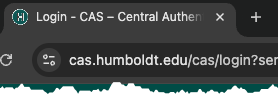
Suspicious myHumboldt Example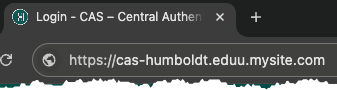
- University Branding: Look for official branding elements such as the Cal Poly Humboldt logo and "myHumboldt" header. Note that branding alone is not a guarantee of authenticity.
- Security Notice: In the login page text, there is a statement:
"Before entering your Humboldt User Name and Password, verify that the URL for this page begins with: https://cas.humboldt.edu"
The cas.humboldt.edu text is a link pointing to the correct authentication website. Confirm this matches the address bar as shown in step 1, and also that the link itself appears correct when you hover over it. - System Time: Verify that the system time shown on the login page matches your device’s time.
Additional tips
- Always log out and close your browser after accessing University services.
- Never share your password. If unsure, reset your password or contact IT support.
- Look for CSU Privacy and Responsible Use notices to ensure you're on a CSU-governed site.
Help Desk Hours
Summer 2026Monday - Friday: 8am - 4:30pm
Closed May 25, June 19, July 3
After hours emergencies:
Call UPD at (707) 826-5555
System Status
| Status | System | Est. resolution |
|---|---|---|
| Available | All Systems |
|